














A polished storefront wins hearts, but search engines never see the pretty parts. They read code, links, and structure.
If your ecommerce website design SEO is an afterthought, even the best-looking store stays invisible on Google.
Strong design and strong rankings can live together, and the two feed each other when you build them in from the start.
Architecture Over Aesthetics: The Core of Search-Friendly E-commerce
A gorgeous homepage means little if Google’s crawlers get lost reading your navigation. Search-friendly design starts with structure, not styling.
Search bots follow links and read URLs the way a driver follows road signs. Give them clean paths and they index every page. Bury products behind messy database strings and they wander off.
Two habits keep your architecture readable:
- Use descriptive URLs like /products/leather-tote instead of ?id=8842&cat=17. Real words tell both Google and shoppers what the page holds.
- Keep primary categories within three clicks of the homepage. Pages buried deeper get crawled less and rank slower.
A flat, logical hierarchy also spreads link authority across your catalogue, so your best sellers pull weaker pages up with them. Internal links do the same job. Point category pages to related products and link related items to each other so crawlers and shoppers can move naturally through your store. This is the foundation of ecommerce search-friendly design.
Solving the Facet & Filter Nightmare
Filters for size, colour, and price make shopping easy. They can also quietly wreck your rankings by spawning thousands of near-identical URLs.
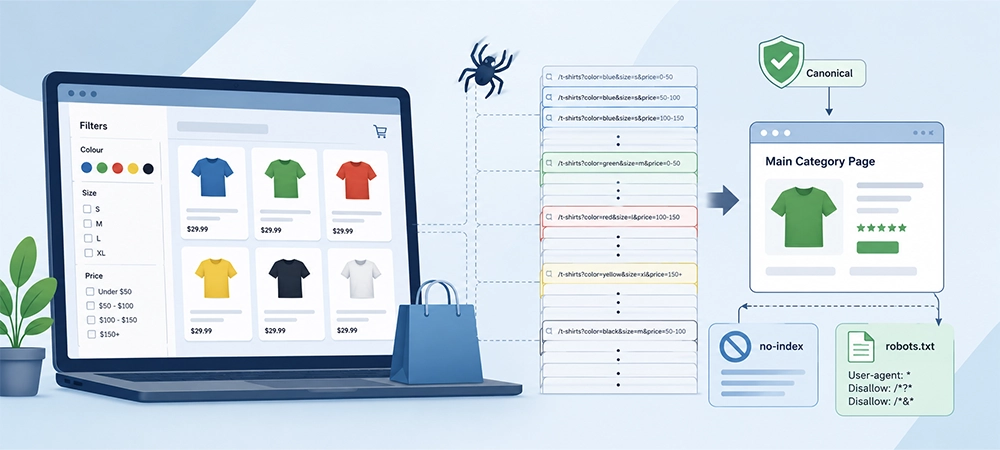
Every filter combination can generate a fresh URL. Multiply five colours by four sizes by three price bands and one category explodes into dozens of thin pages. Search spiders crawl them all, burn their budget, and split your ranking signals.
Fix it behind the scenes while keeping the front end smooth:
- Apply canonical tags so filtered pages point back to the main category as the version that should rank.
- Add no-index rules to low-value combinations you never want appearing in search results.
- Block infinite loops in robots.txt where filter parameters stack endlessly.
Shoppers still get the filters they love. Google gets one clean page to reward. Sorting this out is central to smart product page SEO architecture.
Related Article: The Wise Search: A Step-by-Step Guide to Strategic Keyword Research
Speeding Up the Checkout: Core Web Vitals on Heavy Product Pages
High-end design leans on big, beautiful imagery. Google leans on speed. Slow pages lose rankings and shoppers at the same time.
Core Web Vitals measure how fast and stable your pages feel, and two matter most for product-heavy stores. Largest Contentful Paint tracks how quickly your main image loads. Next-gen formats like WebP and AVIF cut file sizes by half or more with no visible quality loss, so hero shots appear fast.
Cumulative Layout Shift (CLS) measures unexpected movement. Nothing annoys a buyer more than an “Add to Cart” button that jumps as an image loads late. Reserve space for every element with fixed dimensions and styling blocks so the layout holds still.
Lazy-load images below the fold, compress your assets, and trim unused scripts. Do this and checkout stays quick even with rich visuals. Speed matters most on phones, where shoppers bounce fastest and where a one-second delay can measurably drop conversions.
Related Article: Seconds Cost Money: How We Fix Website’s Load Speeds to Boost Conversions
Designing the Invisible: Product Schema Markup for Rich Snippets
Some of your most valuable design work never shows on your site. It lives in the code and talks straight to Google.
Schema markup is structured data that labels your content for search engines. Add product schema and Google can display star ratings, price, and stock status right on the results page, before anyone clicks.
Bake these fields into your product template:
- Price and currency
- Aggregate rating and review count
- Availability, so “In Stock” shows in the listing
- Brand and SKU
Rich snippets make your listing bigger and more clickable than a plain blue link. They also feed the Google Shopping grid, putting your products in front of buyers who are ready to spend.
Keep the markup accurate and current, though. If your schema says a product is in stock when it sold out last week, Google may drop the snippet and trust the rest of your site less.
Related Article: Is It Time to Redesign Your Website? 5 Questions to Ask First
The Ghost Town Effect: Designing Out-of-Stock and Discontinued Pages
A popular product sells out or gets discontinued. Delete the page and you throw away years of ranking authority along with the sale.
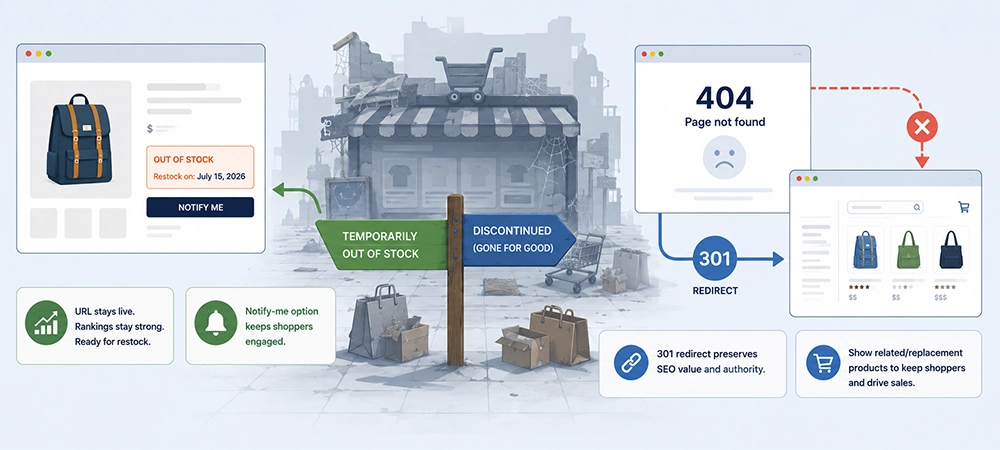
A hard 404 sends visitors to a dead end and tells Google the page is gone for good. Better design keeps the value alive.
When a product is temporarily out of stock, keep the page live and show a restock date or a notify-me option. The URL holds its rank, ready for when inventory returns.
When a product is gone for good, redirect the page with a 301 to the closest match or its parent category. For discontinued items with heavy traffic, render related or replacement products right on the page so shoppers stay and buy something else.
Good UX and ecommerce SEO protect each other here. You keep the ranking, the visitor, and the conversion in one move.
Build a Store That Looks Sharp and Ranks Higher
Great ecommerce design is not a contest between beauty and search performance. The strongest stores treat clean architecture, fast load times, smart schema, and thoughtful error handling as design features, not repairs bolted on later. Get these right and your store earns traffic while it earns trust.
Ready for a store that looks sharp and climbs the rankings? Our team here at Owls Digital’s e-commerce SEO agency can help you build it.
Book a strategy call and start turning browsers into buyers.